
Stop Guessing Your Image Size. Here's the Only Social Media Cheat Sheet You Need.
Every platform has a preferred image shape, and if you don't match it, your content gets chopped up. Here's one chart with the exact ratio for every platform, plus the 3 sizes you actually need to remember.
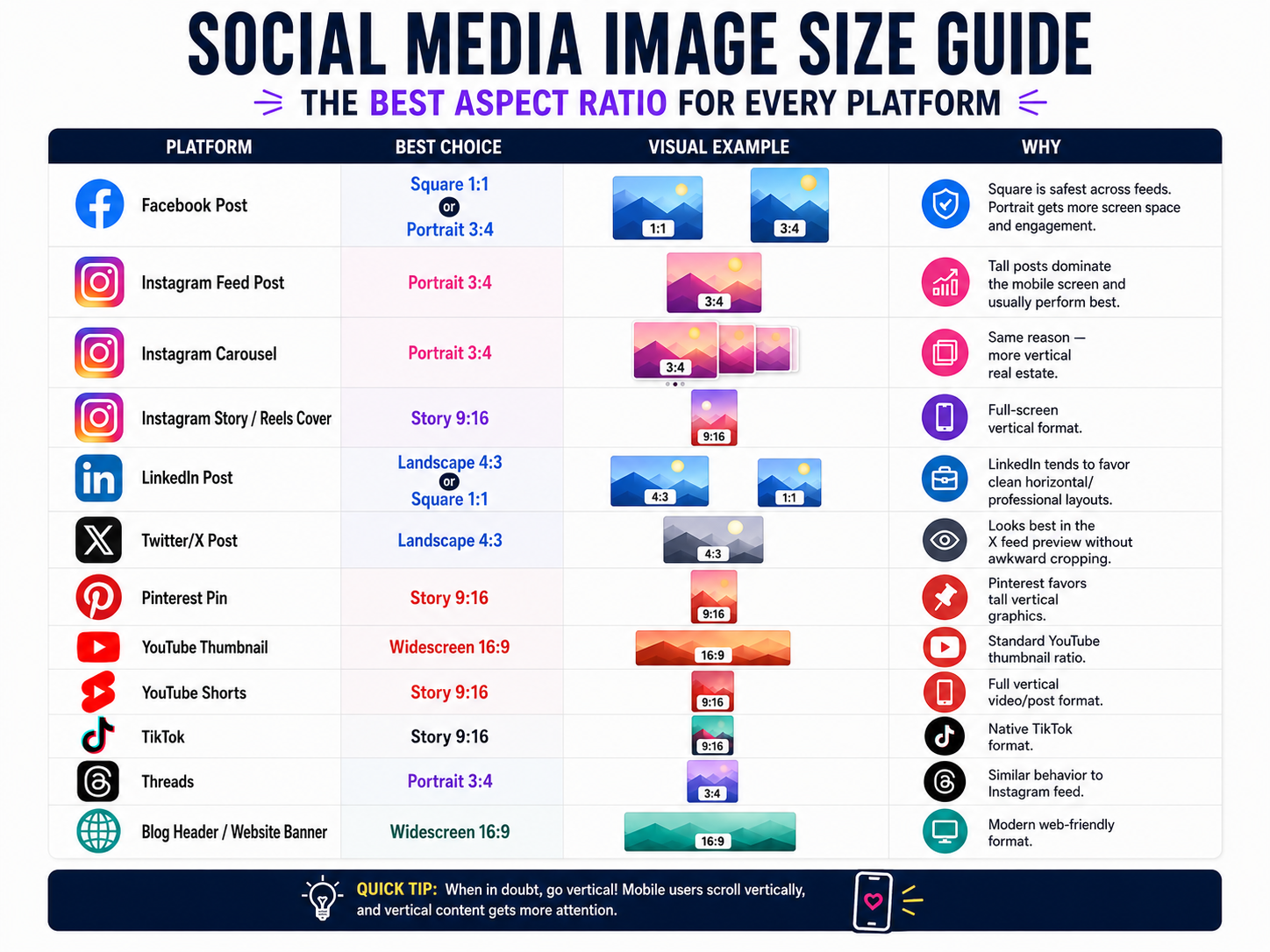
All right, let's get into it.
How many times have you posted a flyer on Instagram, and the top of somebody's head got cut off? Or you shared a graphic on Facebook and it looked perfect on your laptop, but on your phone it was a blurry, cropped mess?
Man, I see this every single week from business owners across DeSoto, Oak Cliff, Lancaster, and the rest of Southern DFW. You spent 45 minutes making a Canva graphic. You were proud of it. And then the platform chopped it up like it owed it money.
Here's the thing. It's not your design skills. It's the wrong image size. Every platform has a preferred shape, and if you don't match it, the algorithm and the preview window are going to do whatever they want with your content.
So I made this simple. One chart. Every platform. The exact ratio you need. Save it, screenshot it, tape it to your monitor. Whatever you have to do. Let's keep it moving.
The Cheat Sheet
Here's what to use on every platform:
Facebook Post , Use Square (1:1) or Portrait (3:4). Square is the safest bet across all feeds. Portrait takes up more screen space and gets better engagement.
Instagram Feed Post , Use Portrait (3:4). Tall posts dominate the mobile screen. This is your best performer.
Instagram Carousel , Use Portrait (3:4). Same reason. More vertical real estate means more attention.
Instagram Story / Reels Cover , Use Story (9:16). Full-screen vertical. That's the whole phone.
LinkedIn Post , Use Landscape (4:3) or Square (1:1). LinkedIn leans professional. Clean horizontal layouts work best here.
Twitter/X Post , Use Landscape (4:3). This looks cleanest in the X feed preview without awkward cropping.
Pinterest Pin , Use Story (9:16). Pinterest loves tall vertical graphics. This is how you get repinned.
YouTube Thumbnail , Use Widescreen (16:9). Standard YouTube format. Don't fight it.
YouTube Shorts , Use Story (9:16). Full vertical video format.
TikTok , Use Story (9:16). Native TikTok format. Anything else gets cropped.
Threads , Use Portrait (3:4). Same behavior as Instagram feed.
Blog Header / Website Banner , Use Widescreen (16:9). Modern web-friendly format.
If You Only Remember Three Sizes
Look, I know that's a lot of platforms. So here's the shortcut. If you only want to remember three formats, remember these:
Square 1:1 , Your safest universal social post. It works everywhere and nothing gets cut off.
Portrait 3:4 , Your best engagement format on Instagram and Facebook. It takes up more of the screen when people are scrolling, which means more eyeballs on your content.
Story 9:16 , Your full-screen vertical. Stories, Reels, TikTok, Shorts. If it's vertical video or a full-screen graphic, this is your format.
That's three sizes. Three. You can handle three. Trust.
The Quick Visual Mindset
Think of it like this:
- 1:1 = classic social media post (the square)
- 3:4 = mobile-feed optimized (a little taller than a square)
- 9:16 = full-screen vertical (your whole phone screen)
- 16:9 = YouTube and web banners (the wide rectangle)
- 4:3 = professional/slideshow feel (think PowerPoint)
Once you see these shapes in your head, you'll never have to Google "what size should my Instagram post be" again. Boom.
The One-Size-Fits-Most Answer
Okay, I know some of you just scrolled straight to the bottom looking for the one answer. I respect that. Here it is.
If you're unsure, use Portrait 3:4.
Right now, 3:4 performs extremely well across Instagram, Facebook, Threads, and LinkedIn mobile. It takes up more vertical screen space while still fitting feeds nicely. If you only make one version of your graphic, make it 3:4 and you're good to go.
Why This Matters for Your Business
Let me connect the dots for you. When your image is the right size, three things happen:
- It looks professional. No more cut-off text or blurry previews. Your business looks like it knows what it's doing.
- The algorithm likes it. Platforms reward content that fits their preferred format. A properly sized post gets shown to more people. That's free reach.
- People engage with it. A tall 3:4 post on Instagram takes up almost the entire phone screen. That's not a small advantage. That's the difference between someone scrolling past your content and actually stopping to read it.
You didn't spend time building your business just to have a bad image crop hide your message. Get the size right and let your content do what it was made to do.
Your Next Move
Save the cheat sheet graphic from this post. Put it somewhere you can find it. Next time you open Canva, start with the right canvas size before you design anything. Something is better than nothing, but the right something saves you from remaking that graphic three times.
And if you need help building a content system that handles all of this for you, whether that's an AI employee that creates and schedules posts in the right format, or a full social media strategy built for your business, that's what we do at HiTek Tech.
📞 682-331-3783
📧 contact@hitektech.net
Holla at me. It's all good.
Frequently Asked Questions
What size image should I make for my Instagram posts in DeSoto?
The best option for mobile screens is Portrait 3:4. It takes up the most vertical space when people scroll on their phones. Boom, you will get way more eyes on your flyer.
Why do my Facebook graphics look cropped or blurry on mobile in DFW?
You are probably using the wrong image ratio for the platform feed. If you want a safe format that works almost anywhere, stick to a Square 1:1 format. Trust, it saves you a lot of headache.
What size graphic should I design for full-screen phone stories in Cedar Hill?
You need to use the Story 9:16 vertical format. This is perfect for Instagram Stories, Reels, and TikTok videos. Keep it moving and stop guessing your sizes.
Written by Manasseh Lee
Founder, HiTek Tech · K-6 Technology Teacher · DeSoto, TX
Manasseh Lee teaches K-6 technology by day and builds AI systems for DFW businesses by night. MBA from Texas A&M Commerce, BS in Computer Science, and 20+ years in education and tech. He helps small business owners, churches, and nonprofits use AI without the stress.
You Might Also Like


Need Help With This?
Whether you need a quick fix today or a full AI strategy for tomorrow, I'm here to help. No jargon. No judgment. Just results.
Book Your Free Growth Call